
An AI assistant on company data: how to deploy it without a data leak
How to deploy an AI assistant on company documents safely: three deployment models, the places data leaks, and the design rules that close them.
An AI assistant that answers questions from your documents saves time. The same assistant can show an employee a file they should never see. You can reduce that risk at the design stage, before anyone asks the first question. Below we explain how, and what such a project looks like with us.
What an AI assistant does with company documents
An AI assistant on company data is a program that reads your documents and answers employees' questions in plain language. You ask it about a contract, a procedure, the history of an order or an offer from last year. Instead of searching a drive, you get an answer that points to its source.
Technically it usually works like this (the technique is called RAG, retrieval-augmented generation). The documents are indexed in advance. When someone asks a question, the system finds matching fragments and attaches them to the question. A language model builds the answer from them.
For security, one thing matters: fragments of your documents leave their place and reach the model. You need to know where they go, who can see them, and whether the system checked who is asking.
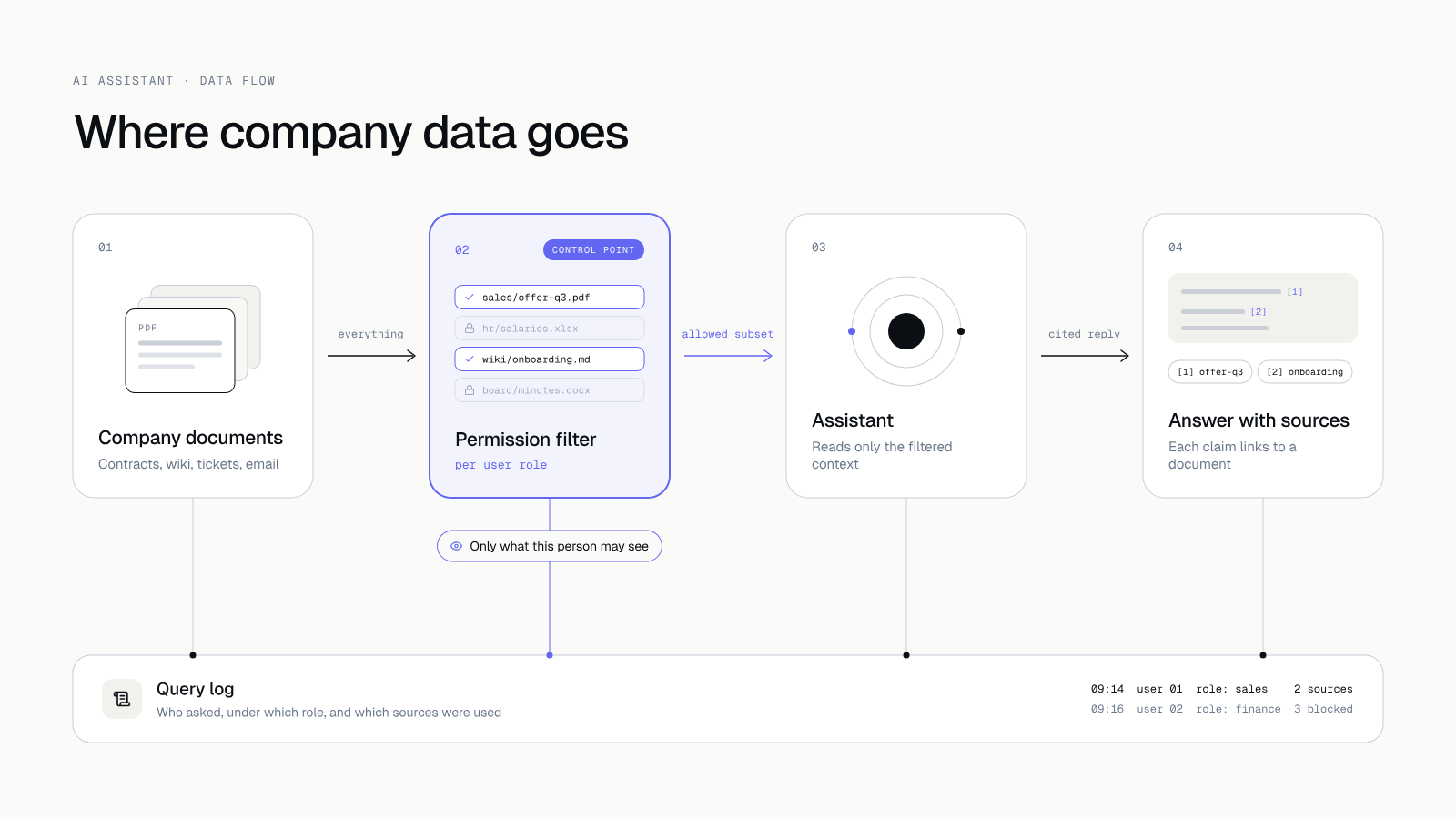 The permission filter sits before the assistant, and every query goes to a log.
Three deployment models
The model you choose decides where the data physically sits and who controls it. There is no single right answer, only a fit to the kind of data.
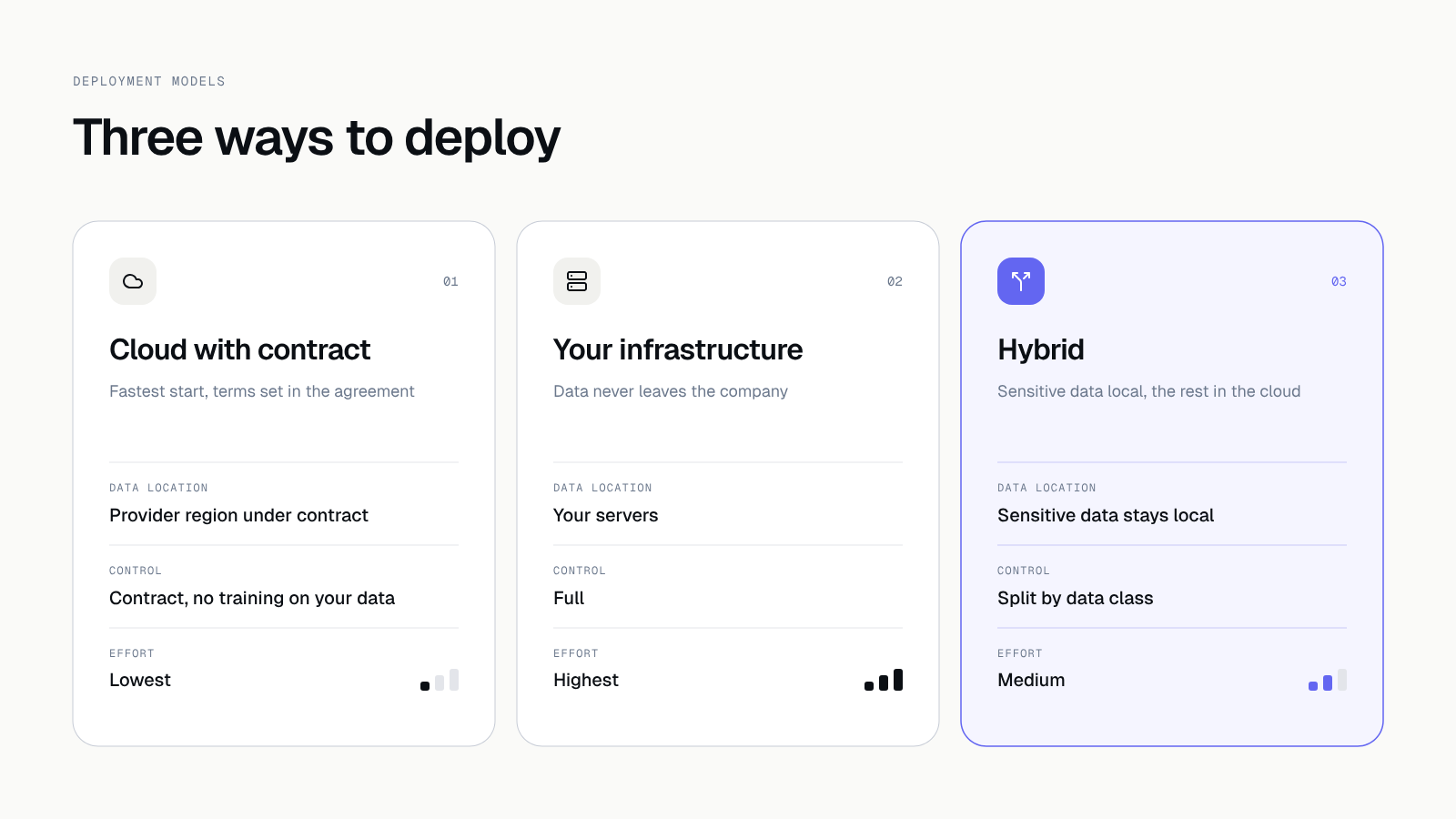 The three models differ in data location, control and effort.
Cloud model with a contract
You use a provider's language model through an API. You write the terms into the contract: your data is not used to train models, the processing region is known, and a data processing agreement is signed. This is the fastest and cheapest route. It suits documents of medium sensitivity, such as procedures, offers or training material.
Model in the client's infrastructure
The language model runs on your servers or in your private cloud. Data never leaves the company. Control is the highest, but infrastructure costs and maintenance work grow. It is a reasonable choice for legal, medical and financial documents.
A combination of both
We split the data into classes. Sensitive data stays with you, and less sensitive data is handled by the cloud model. This needs a simple, clear rule: what belongs to which class and who decides. In practice it is often the best compromise.
Where data leaks
A leak is rarely the result of breaking into the model itself. Most often data flows out through ordinary, mundane places.
| Place | What happens | What we do |
|---|---|---|
| Employee prompts | Someone pastes a client contract or personal data into a chat window | The assistant runs inside a company tool, and the usage rules are written down |
| Provider logs | Queries and answers stay with the model provider | The contract limits retention, and logs hold no personal data |
| No per-user permissions | The assistant sees everything, so it answers everyone about everything | Permissions mirror the roles in your company |
| Integrations | Access to mail, drive or CRM granted more broadly than needed | Least privilege and a separate technical account |
The second row is easy to miss. Even if the model does not learn from your data, queries may be stored in the provider's logs. Check it in the contract before you pick a solution.
Design rules that close these gaps
We apply five rules in every AI deployment.
- Permissions that mirror company roles. The assistant answers from the documents the signed-in employee can already access. A salesperson will not see employment contracts, and an accountant will not see offers they do not handle. The filter works before the model, so fragments without access never reach it.
- Data minimisation. We send the model only the fragments needed for the answer. We mask personal data where it is not needed. The assistant gets only the scope agreed at the workshop.
- Query logging. We record who asked what, when, and which sources the system used. This lets you explain an incident and adjust settings. The logs themselves hold no personal data.
- Security tests before launch. We check whether permissions can be bypassed, whether a clever question can pull out someone else's document, and whether a command can be injected through document content. We fix critical and high findings before launch.
- GDPR and a processing agreement. We map which personal data enters the system and sign processing agreements with the hosting and model providers. This needs legal advice on your side. You settle the legal basis and the retention period with your lawyer or data protection officer.
We cover the questions to ask a contractor in more depth in Your customers' data in your app: 15 questions for the contractor.
Questions for the provider before you sign
Whatever the deployment model, ask the model and hosting providers the same questions. Get the answers into the contract.
- Is data from queries and documents used to train models? The answer should be written as "no".
- In which region is data processed and stored?
- How long does the provider keep query logs, and can that be shortened?
- Is a data processing agreement part of the offer?
- What happens to the data when the cooperation ends, and who deletes it?
- Which provider staff can see your queries?
If a provider cannot answer one of them, treat it as a warning sign. The same logic works for choosing a vendor, which we describe in How to choose a software house.
What an AI assistant will not fix
An assistant will not clean up a mess in your documents. If three versions of the same procedure circulate in the company, you will get an answer based on one of them. Before launch it is worth tidying the sources: name the current version and the owner of each document.
Nor will an assistant replace human judgment where a mistake is costly. For contracts, quotes and legal matters, an answer with a source is a starting point for checking, and a person makes the decision. In the prototype we show the source next to every answer so that checking takes a few seconds.
What a project looks like at Hindbrain
We work through the same six stages as on any product. The AI assistant has its fixed checkpoints inside them.
- Idea. A free call of about an hour. We settle which questions the assistant should handle and whether AI is needed at all.
- Onboarding (discovery workshop). The workshop takes 2 to 3 hours and is led with people who know the documents. We classify the data, set the roles and choose the deployment model. The result is a scope, a schedule and a fixed quote.
- Design (prototype). A clickable prototype shows what a question, an answer with a source and a denied request look like. You test it with employees.
- Product (sprints). We build in two-week sprints with a demo at the end. A staging environment is always available.
- Launch (audit before go-live). Before launch we run a security audit: permissions, leaks between roles, dependencies, backups. You get the report with the product. We describe it in Application security audit.
- Growth and care. Monitoring, updates, vulnerability patching and a monthly report.
Code, designs and accounts are yours from day one, and after every stage you decide whether we continue. That means the data and the assistant's configuration stay with you too.
What to do today
List the five questions your team answers most often and note which documents hold each answer. Next to each document write one word: public, internal or confidential. That list is half the material for a discovery workshop.
Let's talk about an assistant on your data
If you are thinking about AI on company documents and want to know which deployment model fits your data, book a discovery workshop. We start with a free call, no commitment. Book a call.