
Application security audit: 12 things we check before launch
What an application security audit checks before launch: 12 points in working order, a 5-day schedule and what the report you receive contains.
Most weaknesses in applications are mundane: permissions that are too broad, outdated libraries, a password set once and forgotten. An application security audit checks them one by one before someone outside does. Below we show how our pre-launch audit works, what it covers and what ends up in your hands.
Where the audit starts
The audit starts with agreements, not with a scanner. On the first day we write down three things: scope, rules of testing and a threat model.
Scope is the list of domains, APIs, mobile apps and the test environment, along with test accounts for every user role. We test staging. We do not touch production with your customers' data.
The client signs the rules of testing. The written consent defines the time window, what is allowed and an emergency contact. Load attacks are not part of the rules, and social engineering needs your separate consent.
The threat model fits on one page: which data is the most valuable, who might want it and where the money sits in the system. It tells us where to spend more time.
Why the order matters
The list runs from the cheapest checks to the most expensive. Automated tools cost hours and weed out obvious problems straight away. Manual tests cost days, so we start them once we know what has already been fixed. We check configuration last, because it needs conversations with the people who hold access to the systems.
This order also protects your budget. You do not pay for a manual hunt for a weakness that a dependency scanner finds in minutes.
Five stages in five working days
For a typical B2B application the audit takes 4 to 5 working days. The course is always the same: scope and consent, automated tests, manual tests, configuration and operations, report with a retest.
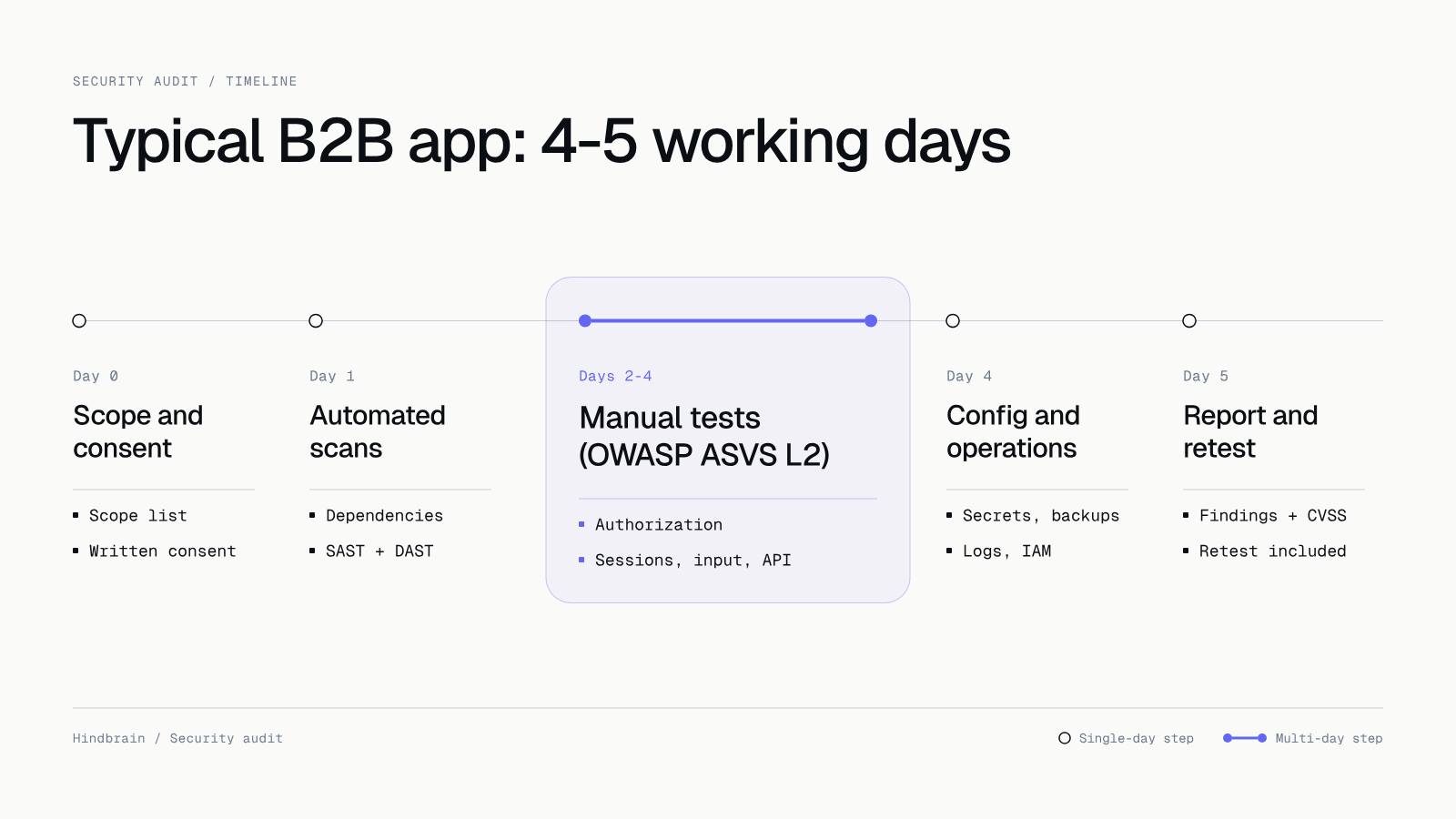 Five stages of an audit for a typical B2B application. Manual tests take the most time.
The standard we measure the application against is OWASP ASVS level 2. For fintech and medical products we aim for level 3. We run the penetration tests ourselves, so you do not wait for an external partner or their calendar.
Day 0 and 1: scope, consent and automated scans
The first five points on our list cover scope and automated tests. The tools give us candidates to verify. We confirm every entry by hand, so the report has no false alarms.
- Scope, consent and threat model. Everything described above, before the first tool runs.
- Dependencies and images. osv-scanner or pnpm audit for libraries, trivy for Docker images. An old library with a known flaw is a classic finding, and the fix is often as simple as raising a version.
- Secrets in repository history. gitleaks searches the whole repository history, including old versions. A key deleted a year ago still works if nobody rotated it.
- Static code analysis. semgrep with OWASP rules for your stack catches patterns that usually end in a vulnerability.
- Scan of the running application. OWASP ZAP or Burp on staging, nuclei on the infrastructure, plus testssl.sh and Mozilla Observatory for TLS, headers and CSP.
Days 2 to 4: manual tests under OWASP ASVS L2
This is where we spend the most time, because a tool does not understand your business. A scanner does not know that one company's invoice must not be visible to another. We check that.
- Authorization and data isolation. Does a user who changes a number in the address see someone else's records (IDOR)? Can the "employee" role perform an "administrator" action? In multi-tenant systems we check that one company's data is walled off from another's.
- Authentication and sessions. Password reset, protection against password guessing and attempt limits, session lifetime, logout, 2FA, tokens in URLs.
- Input validation. SQL injection, XSS, SSRF, file upload and injection through integrations: webhooks and CSV imports.
- Business logic. Skipping the payment step, using a coupon twice, a race between two requests on the same balance. These errors look like valid traffic, so only a human finds them.
- APIs and mobile apps. Missing limits, response fields the client does not need, mass assignment and undocumented endpoints. In iOS and Android apps, following OWASP MASVS, we check data in the keychain and keystore, certificate pinning, secrets in the binary, deep links and logs.
Day 4: configuration and operations
Well written code will not protect a system if the production key sits in a chat and the backup has never been restored. This stage is about people and configuration.
- Secrets, permissions and backups. Where secrets live, how they are rotated, who has production access and whether MFA is on for the cloud, DNS, app stores and the repository. IAM permissions should be the minimum needed, and CI gets separate roles. Backups must exist, be encrypted, and a restore must be tested and timed.
- Monitoring, logs and GDPR. Would the system notice a thousand failed logins? Do the logs contain personal data? Is there a record of processing, data processing agreements with suppliers (hosting, email, analytics) and retention rules?
What you get in the report
The report is ready on day 5 and has two layers: one for the board, one for the technical team.
The executive summary fits in three sentences. It contains the overall rating and the number of findings per severity level. After that, every finding has the same layout.
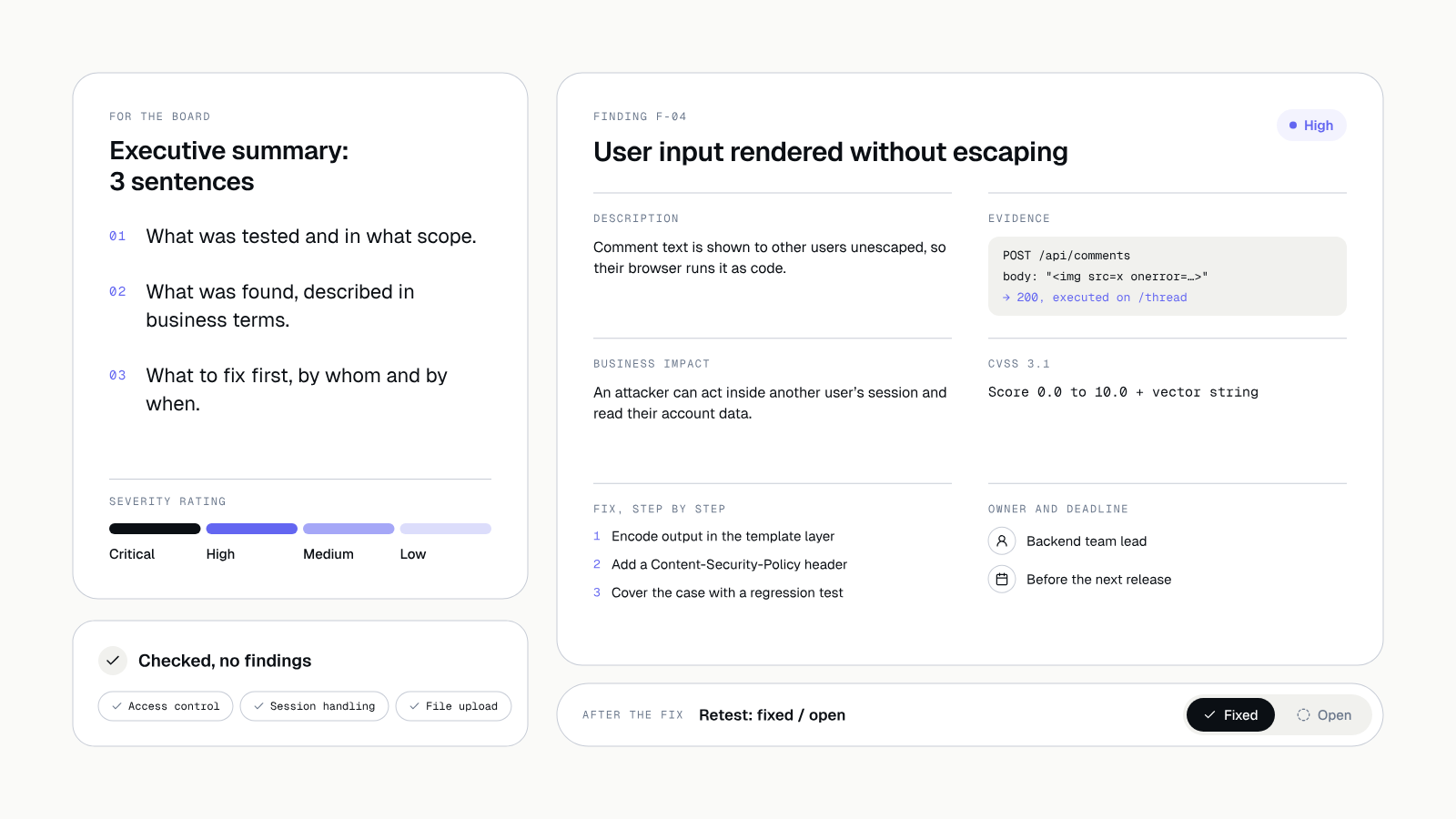 The report has an executive summary and a card for every finding.
- a description of the problem and proof that it can be reproduced,
- business impact written in language a non-technical person understands,
- a CVSS 3.1 score,
- a step-by-step fix,
- an owner for the fix and a deadline.
The report also lists everything checked without reservations. You know what to fix and what passed. A retest after the fixes is included in the price. It goes into the same report, marked "fixed" or "open".
Where the audit fits in the process
The audit is not a separate service bolted on at the end. It is part of the Launch stage in our six-stage process: Idea, Onboarding, Design, Product, Launch, Growth and care.
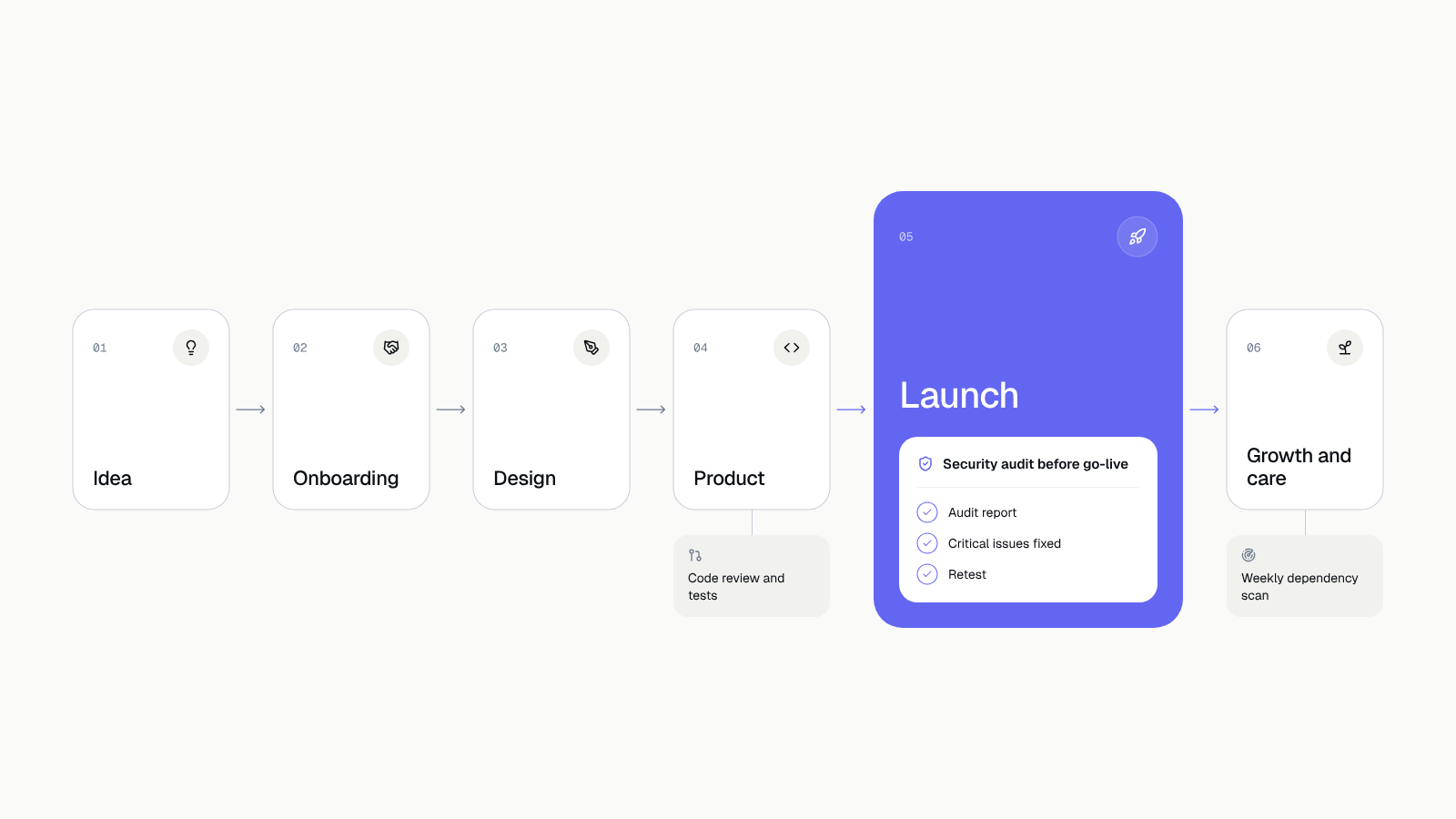 The pre-launch audit is part of the Launch stage. Tests and code review come earlier, a weekly dependency scan comes later.
There is one rule: we fix critical and high findings before launch. A product does not ship with an open critical issue. You receive the report together with the product, and the code, designs and accounts are yours from day one, so you can show it to an auditor, an investor or an enterprise customer.
After launch, security moves into care: a dependency scan every week in CI, a permissions review every quarter, a retest after every major feature and a full audit once a year.
What to do today
Take an hour and check point 11, because it is the cheapest. List who has access to production, the cloud, DNS, the app stores and the repository. Next to each person, mark whether MFA is on. If the list is longer than you expected, you already have a first finding without any scanner.
A second step for today: ask your team when a backup was last restored in a test. No answer is an answer.
Let's talk about an audit
Planning to launch an application, or running one for a long time that nobody has checked from the outside? Tell us what you have. In a free call we will define the scope and what is missing for an audit to make sense. Book a free call.
If you are looking for a vendor that runs an audit before launch as a standard, read also how to choose a software house. If you are taking over an application from someone else, start with Taking over an existing app. We discuss the cost of an audit and other parts of a project in How much does an app cost.