
React Native or native? Start with the requirements
Compare native apps and React Native through features, team skills, security and the cost of maintenance after release.
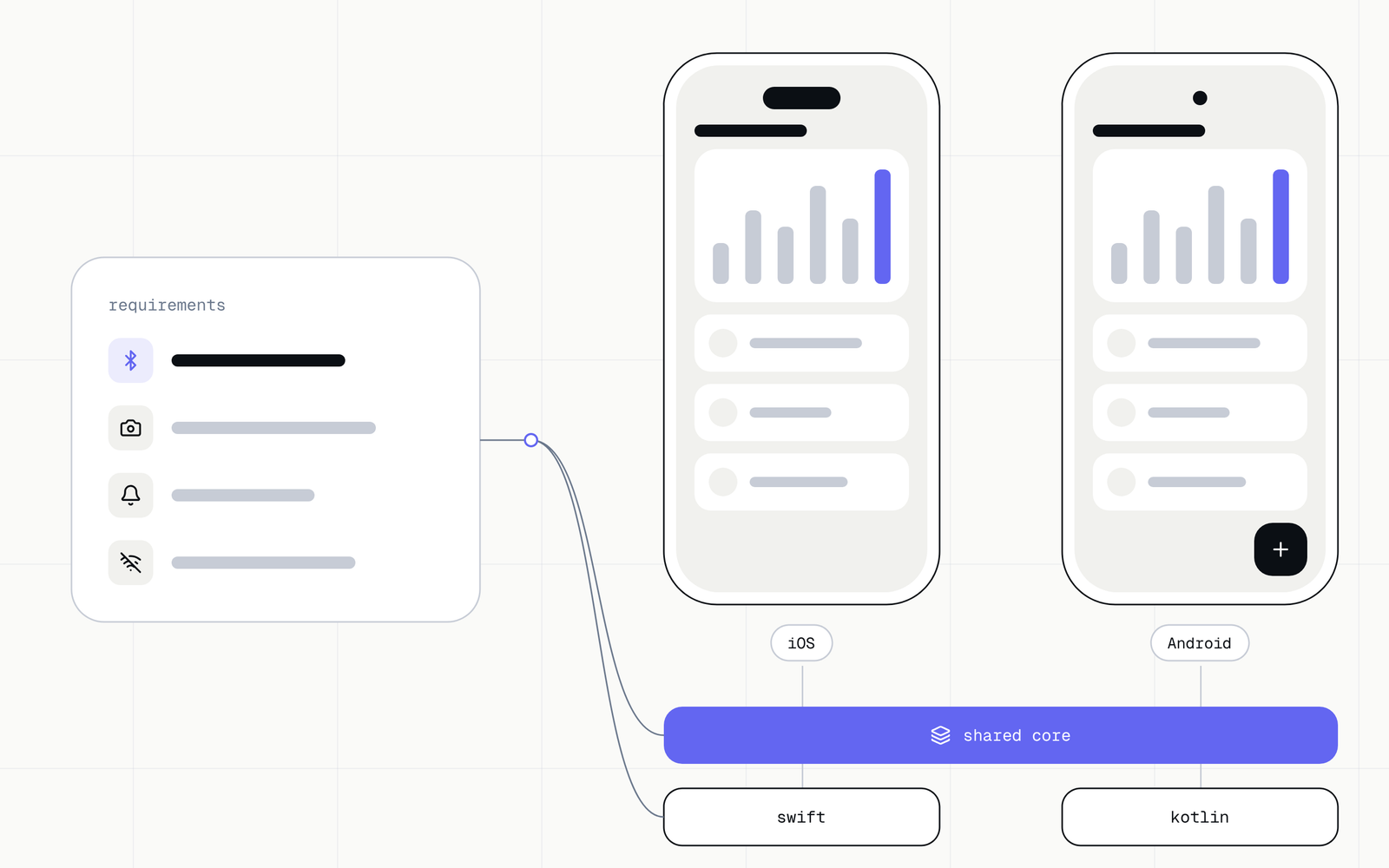
"Native or cross-platform?" is a common first question, but on its own it does not describe a product. What matters more is which features the app has to provide, which devices it runs on, how it protects data and who will develop it after release. This text helps turn those answers into a decision.
What each approach means
A native app is built with the tools and languages of a given platform: separately for iOS and separately for Android. React Native lets you build the mobile interface in JavaScript or TypeScript and share the app logic between platforms. The details depend on the features and the libraries used.
"Shared code" does not mean one identical interface or no platform work. Integrations, performance, interactions and system requirements have to be checked for the specific product.
Compare the requirements
Before you choose a technology, answer these questions:
- Does the app depend heavily on system features, peripherals or background work?
- Does the team need a similar pace of development on iOS and Android?
- How important are platform interaction patterns, accessibility and polished animation?
- Is there existing code, team skill or a library that has to be maintained?
- Who will update the dependencies and handle changes in operating systems?
The answers point to areas to prototype. Check an especially risky integration before you freeze the architecture.
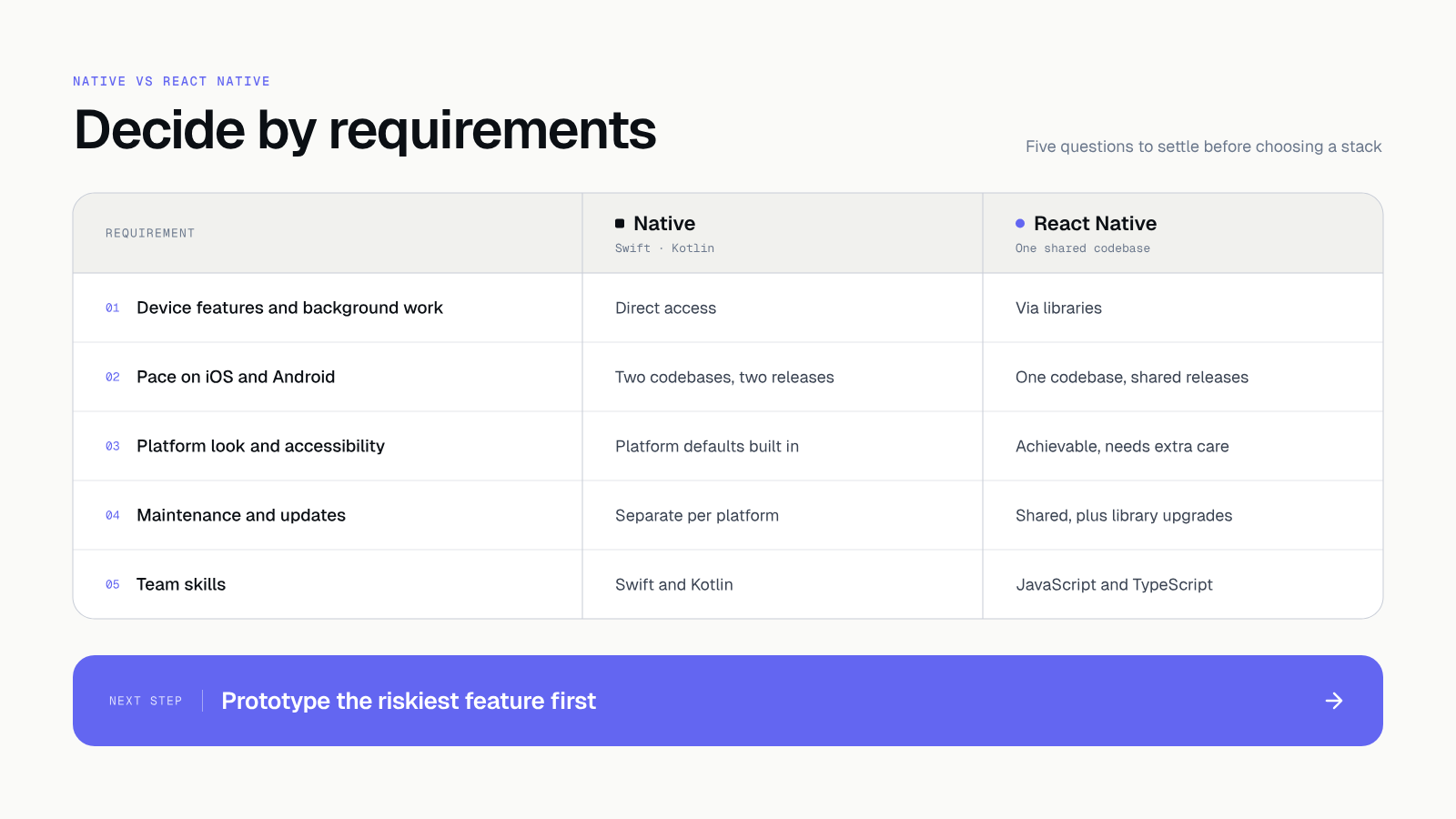 Five criteria we use to compare the two approaches.
Mobile app security
Choosing a technology does not remove the work on security. A mobile app runs on a device you do not control, so anything stored in it can be read. That is why we use OWASP MASVS, the international standard of requirements for mobile apps, and the MASTG testing guide.
In practice we check, among other things:
- where tokens and user data are kept (the system's secure storage: Keychain on iOS, Keystore on Android),
- whether the installation file contains secrets,
- whether communication with the server is protected, including certificate pinning where it makes sense,
- how the app handles links that open it from outside (deep links),
- whether logs hold personal data.
Both routes need the same checks. React Native adds one more thing: third-party libraries. Each one is someone else's code inside your app, so we scan dependencies with every change.
Count the cost of the whole cycle
The comparison does not end with the first version. Include project setup, testing on devices, store releases, dependency updates, integration maintenance and the skills needed to diagnose problems. Two approaches can have a similar starting cost and different maintenance needs.
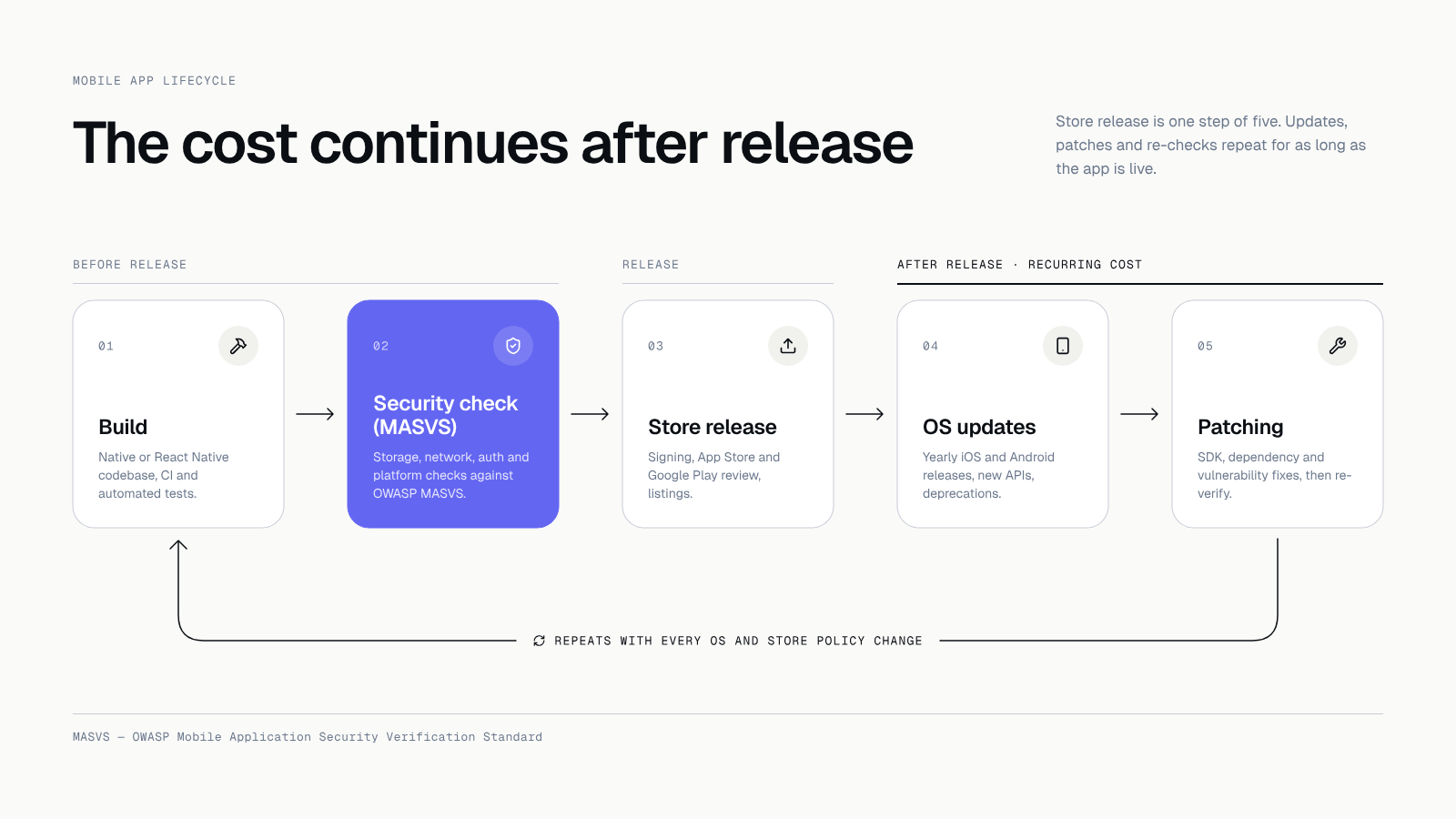 Work continues after release: systems change and vulnerabilities come to light.
Three parts of this cycle surprise people most often:
- The stores. The App Store and Google Play have their own requirements and review processes. A change of rules can force fixes in an app that worked until then.
- New system versions. Every year iOS and Android change their rules, so the app needs an update even when you add no features.
- Patching. When a vulnerability appears in a library you use, someone has to patch it and release a new version. A maintenance contract says who does it and how fast. We write more about the costs in The app works, so why maintain it.
Do not assume either that a cross-platform approach means half the work, or that native always gives a noticeably better experience. The result depends on the product, the team and the quality of execution.
How to read the comparison
A comparison rarely gives a clear verdict. These simple hints help, and each has to be checked on your own product.
- When the key features rest mostly on screens, lists, forms and communication with a server, shared code often makes it easier to keep one version of the product on both platforms.
- When the product relies on deep system integration, background work or peripherals, a native app or native modules may give more control. Always confirm it with a prototype.
- When the team already knows one technology, the cost of changing it counts as much as the cost of building.
- When the app handles sensitive data, put the security requirements in the scope before choosing the technology. Adding them later costs more.
Write the reasoning for the choice in one paragraph. When someone asks a year from now why the approach was chosen, you will have a ready answer.
Questions for the contractor
Before you sign, ask about the things that surface after release:
- Who publishes the app in the stores, and on whose account?
- How often are dependencies updated, and who is responsible?
- What does the security check before release look like, and will I get its report?
- What happens when a store rejects a version or a critical vulnerability appears?
- After the cooperation ends, will I get the code, the designs and the access?
A contractor who answers these concretely usually has an orderly process too. Do not treat what you hear as a promise. Ask for it in the contract.
Run a small decision test
Before a large investment, prepare a trial of the biggest risk: for example a required integration, a high-performance flow or an accessibility behaviour. Check it on target devices, with the person who will maintain the code. Write down the result, the limits and the cost of taking the solution further.
With us this test is part of the design stage. A clickable prototype in Figma shows the look, and a short technical prototype checks the risky feature. Changing the decision at this point costs hours. After the code is written it would cost weeks.
How it looks in a project
After the technology is chosen, we work in two-week sprints. After each one you get a working version to test, and a staging environment is always available. Before the store release we run a security audit and you get its report with the app. We describe the details in Application security audit.
Code, designs and store accounts are yours from day one. That way a change of contractor in the future needs no negotiation. If you are choosing a contractor, see 9 questions that show whether they will deliver.
What to do today
List the three features without which the app makes no sense, and mark for each whether it uses a device feature (camera, Bluetooth, background work, notifications). The list points to the feature for the first test and is good material for a conversation about technology.
Let's talk about your app
If you do not know which way to go, the first call takes about an hour and is free. We will say what speaks for which approach in your case and what to check with a prototype. Tell us about your app.
Takeaway: Choose the technology after checking the product's requirements and the team's work. A framework name will not replace a prototype of the risky features, a security check or a maintenance plan.
Further reading: See a mobile app project for phones and tablets: Kokon.